공예·공예소품모음
CREATOR'S RESULT
MAKE IT YOURS
당신의 아이디어로 바꿔보세요.
01
원하는 부분을 바꾸고 프롬프트를 복사해요.
02
챗GPT(ChatGPT)에 붙여넣고 첫 결과를 확인해요.
03
한 번에 한 가지씩 바꾸며 나만의 결과를 찾아요.
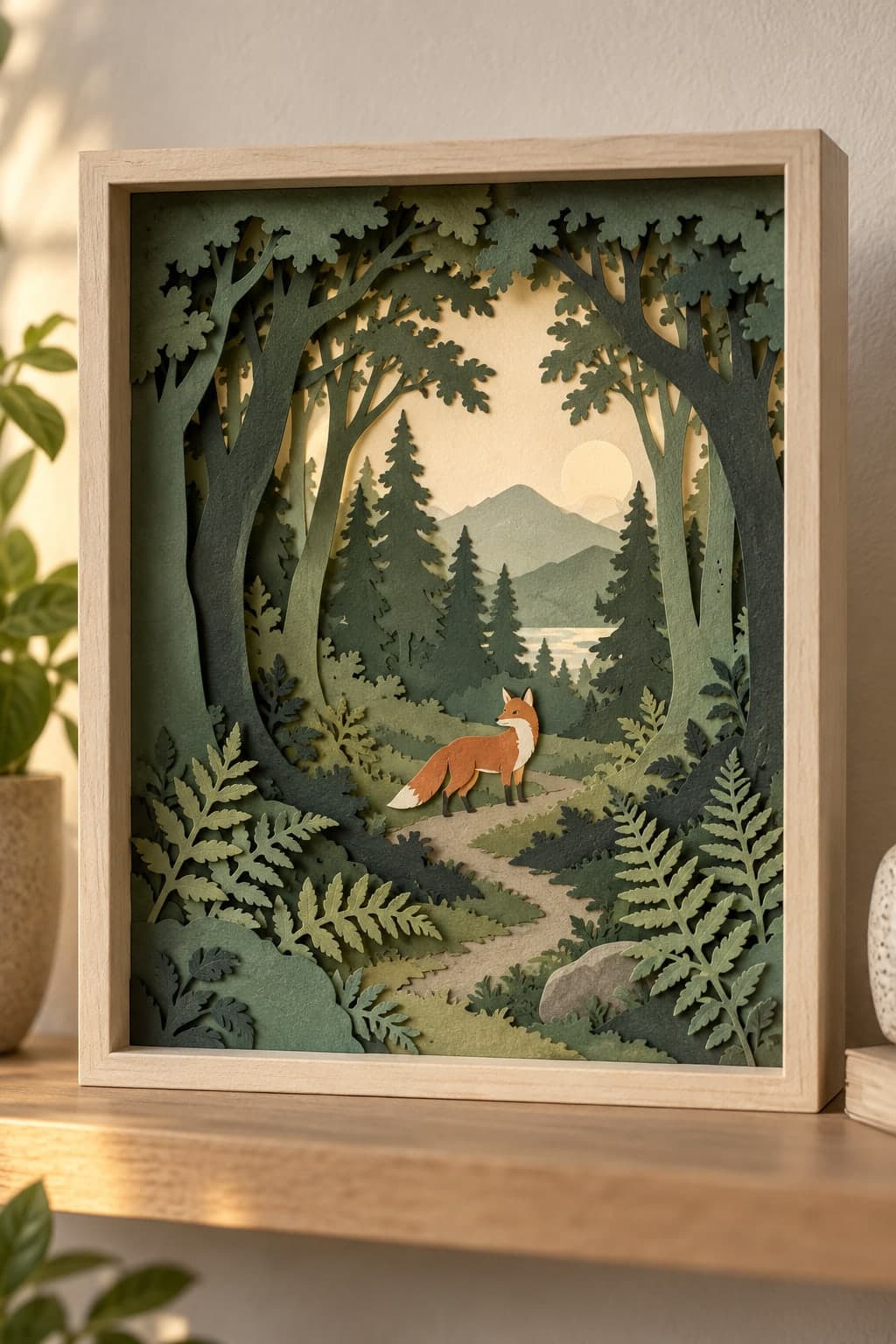
종이 층으로 만든 여우 숲 디오라마 프롬프트 종이 층으로 만든 여우 숲 디오라마
겹겹이 오린 종이로 숲속 장면을 구성합니다. 작은 여우와 나무 사이의 깊이감을 종이 그림자로 표현해보세요.
이 프롬프트가 담긴 모음: 수공예 소품 이미지 프롬프트 모음
나에게 맞게 바꾸기
선택아래 항목을 채우면 프롬프트에 바로 반영돼요.
THE PROMPT989 characters
Use case: product-mockup.
Scene and composition: A handcrafted layered paper-cut diorama inside one shallow pale wooden shadow box, viewed almost straight on with a slight angle that reveals paper depth. Five distinct cut-paper planes form a quiet forest with curved tree trunks, fern silhouettes, a small path and one small stylized orange fox in the middle ground. Matte cardstock with crisp cut edges, slightly fibrous paper texture and realistic tiny cast shadows between layers; visibly physical paper craft, not a painted landscape or flat vector graphic. The complete rectangular box sits on a clean shelf with margins on all sides in a vertical 2:3 photograph. Balanced intricate detail without excessive tiny pieces. No lettering, tools, hands or watermarks.
Main material colors: [주조색].
Lighting: [빛분위기].
Deliver one finished image, not a collage or contact sheet. Original design, no imitation of a specific artist or branded collection. No added text, signatures or watermarks.
입력한 내용을 반영한 프롬프트예요.
크리에이터의 작은 팁
예시값: 주조색=sage and forest green layers, warm cream sky and burnt-orange fox, 빛분위기=soft warm side lighting that reveals the spacing between paper layers. 종이의 층 수와 각 층 사이의 그림자를 명시하면 입체감이 잘 드러납니다. 여우는 한 마리만 두고 나무 실루엣을 단순하게 유지해보세요. 예시 이미지는 위 예시값을 넣은 프롬프트로 OpenAI 내장 이미지 생성 도구에서 직접 제작했습니다. 생성 결과는 실행할 때마다 달라질 수 있습니다.
KEEP YOUR CURIOSITY GOING
공예 더 보기 
함께 나누는 이야기 0
직접 써본 경험이나 새로운 아이디어를 들려주세요.
로그인하고 이야기를 남겨주세요.